
 Targeted LinkedIn Profile Views?

We all want more LinkedIn profile views. We want people coming to our profile but what we really want is for people who can affect our career to review or view our LinkedIn profile.
Whether you are looking for a job or looking for leads to new clients, one of the keys is to get more views of your LinkedIn profile from recruiters, hiring managers and prospects.
First look at how frequently your profile is viewed.
This can be found at https://www.linkedin.com/me/profile-views/

The first thing I want you to notice is the total number of viewers to your profile over the past 90 days. LinkedIn used to track the trends from week to week and provide that data for you but that is no longer.
How many are enough views? That depends. This is very similar to how many connections do you need. You can read more about that topic in the post Search enough How Many LinkedIn Connections are Enough Connections?
The more niche your skillset the fewer connections you need. The broader the audience you are trying to attract the larger your LinkedIn network should be.
Why Do People View Your Profile
I believe there are 3 main reasons why people will want to view your profile.
- Search – If someone like a recruiter is performing a search, their goal is to view a set of profiles that meet the search criteria.
- Content That You Post – When you post content that people like, whether it is your own or curated content, readers may want to look at your profile.
- Reflexive View – When people see that you have viewed their profile, they very often reflexively view your profile.
Let’s look at what you can do to attract people to view your profile for each of these criteria.
Attracting More LinkedIn Profile Views Via Search
If you want to get more views from recruiters, the solution is to understand how they are performing searches.

Listen to the most recent episode
Primarily, they are searching for current job titles and keywords. Your current job title is any position that the end date is present. You can look at my 3 jobs listed in my profile. This includes my primary business, my podcast and my volunteer work that is closely aligned with my business.



I point this out because this allows me to have 3 current job titles that could be found in searches.
You then need to place keywords strategically in your profile. Please check out the post, Why Are You Not Being Found? Try Thinking Like a Recruiter on the importance of the current job title and how to insert keywords without being spammy.
If you have the current job title and keywords that recruiters are searching you will get more LinkedIn profile views from recruiters who are searching for people like yourself.
Attracting Views from Posting Relevant Content
One would think the more you post, the more times people will see your content and click on it. LinkedIn is like Twitter and FaceBook as they have implemented algorithms that filter the content that any user will see. If you post a particular article on LinkedIn only a subset of your connections and followers will see that content.
I am a user of Buffer to schedule all of my content. On one of their recent podcasts, they discussed how on most of the social media platforms the more you post, the fewer people will see each post. On LinkedIn, I now post 4 times a day based on times that buffer suggested to me.
What Content to Post?
I post 3 kinds of content:
- New content I create each week
- Evergreen content or content that I wrote that does not go out of date from my archives
- Curated content from my favorite websites
On any given day, I automatically post 2 evergreen posts from my archives. This is selected by a tool I use called HiPlayApp which schedules posts into the buffer queue.
When new posts are created, which I do 4 times a week, I will manually schedule into the buffer queue. Usually, I will have them post 2 -3 times during that week.
It is the last option, that will be most interesting and profitable for you. Several times a week, I go look for interesting content and I start scheduling them into Buffer. I might schedule an entire weeks worth of content in about 15 minutes. The key is to know where to find new relevant material that your followers will find interesting.
One option is to use a Twitter list to follow a small number of Twitter ids. I harvest a lot of content from email newsletters I receive.
This is an option that you just have to play with. Even with a free Buffer account, you will be able to see statistics on which posts are interesting to your audience.
The more relevant content you post the more LinkedIn profile views you will receive from like-minded people.
The Reflexive LinkedIn Profile Views
Some people will look at your profile if they see that you looked at their profile. This is particularly true for recruiters who are heavy users of LinkedIn.
Step 1 is to make sure that what is displayed when you look at someone’s profile. You can check this here https://www.linkedin.com/psettings/profile-visibility.
You will see something like the following:
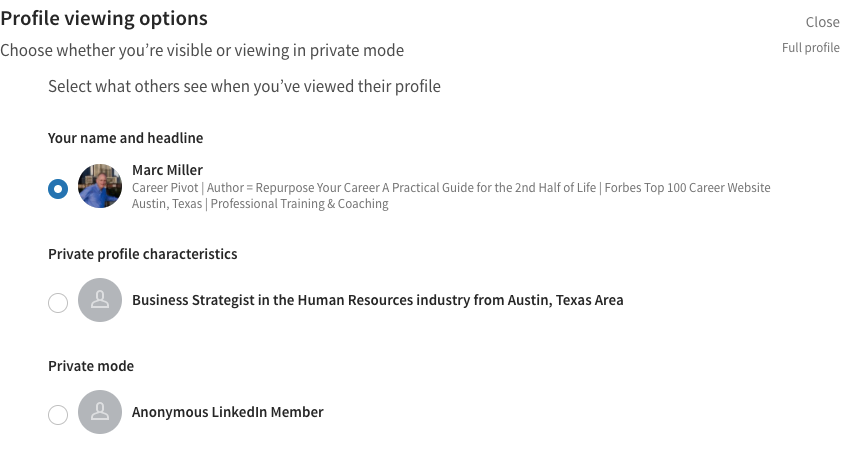
You can set up your account so that when you view someone else’s profile they see:
- Your name and headline
- Private profile characteristics
- Private
Unless you are doing some competitive analysis you should always display your name and headline. It is also key that you have a good photograph. Without a photograph, the odds of someone clicking on your profile drops tremendously.
Systematically Look at Profiles at Your Target Companies
Now is the time to get very systematic in your approach. Start viewing profiles a few each day at your target companies and then monitor who looks back.
DO NOT STALK!
Rotate through your list. Be systematic. Look at a few LinkedIn profiles a day.
Due to the fact that you are only looking at profiles that are at your targeted companies, you will get LinkedIn profile views from people you want to view your profile.
What to Do When Someone Looks at Your Profile
When someone looks at your LinkedIn profile send them a LinkedIn Inmail or a connection request stating that you saw that they looked at your LinkedIn profile, and you would like to ask them some advice.
This is a step in the AIR, Advice, Insights and Recommendation method. The magic word to use is “advice”.
The point is to engage them in a dialog and using the ploy of looking at their LinkedIn profile to get them curious enough to look at yours!
Will this always work? NO!
A lot will depend on how they use LinkedIn.
Give it a try!
Marc MillerLike What Your Read? Get Career Pivot Insights
Do You Need Help With ...

Check out our Help Center where you have access to 14 different content portals.
